Project Overview
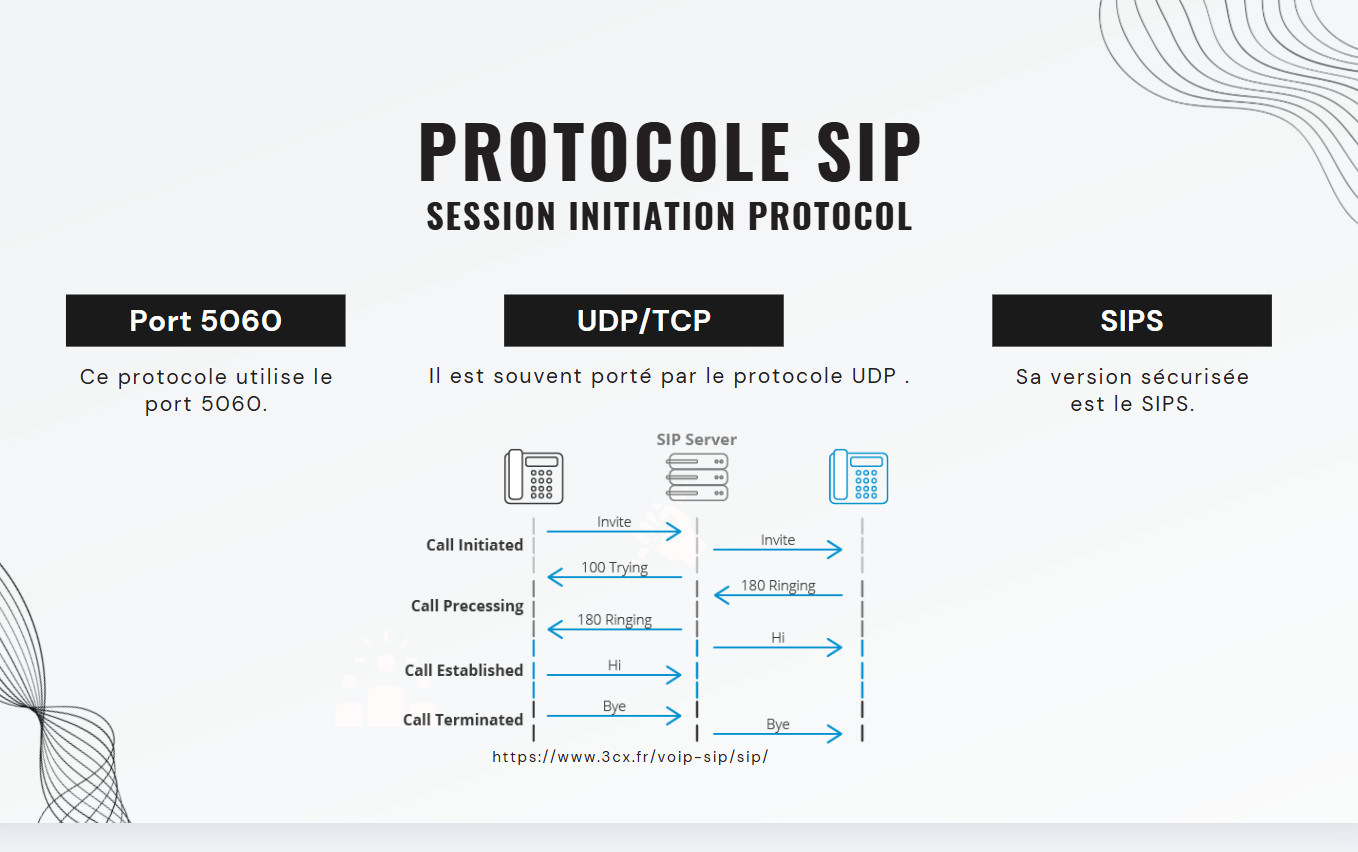
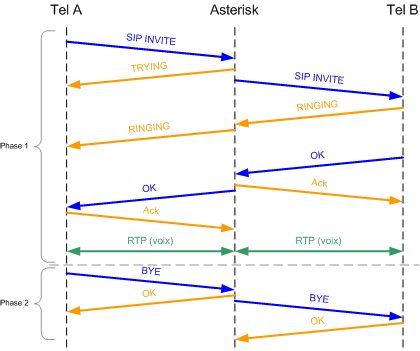
This innovative project involved deploying an Asterisk VoIP server on Raspberry Pi with advanced integrations to modern web services. The system handles not only traditional telephone communications but also integration with Discord, real-time WebSockets, and a custom web interface for monitoring and administration.
The server was configured with strict security rules, including NAT/firewall management, IP access limitation, and enhanced authentication. Custom Python scripts were developed to automate tasks and redirect calls to external web services.
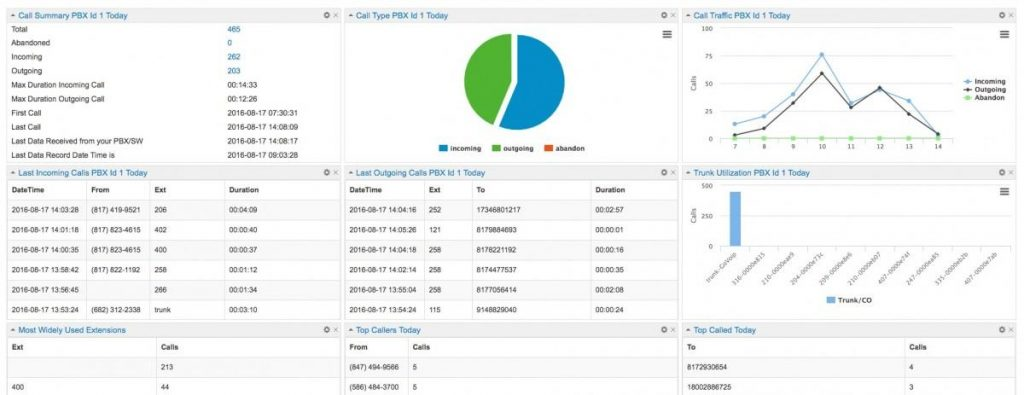
The architecture enables real-time call monitoring via WebSocket, automatic Discord notifications, and dynamic extension management with redirection to web servers.
Technical Details
Technologies Used
Project Duration
4 months (September - Decembre 2024)
Challenges and Solutions
The main technical challenges encountered during this project were:
- Advanced NAT/firewall configuration to enable SIP communications across different networks
- Development of a Discord webhook system for real-time call notifications
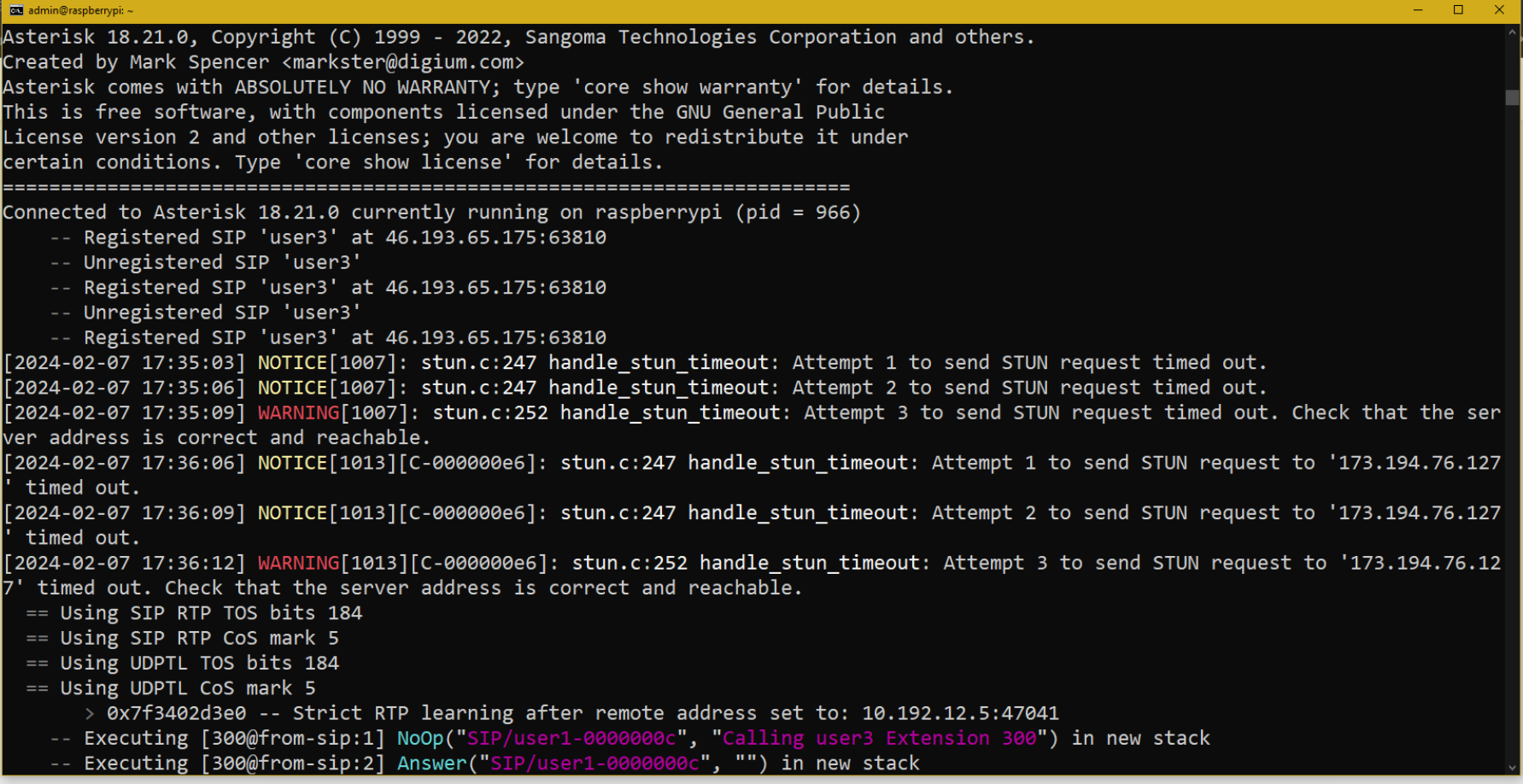
- WebSocket integration for log streaming to the web interface
- Creation of Python scripts for dynamic extension redirection to web servers
- Permission management and security against SIP attacks (IP denial, authentication)
- Performance optimization on Raspberry Pi with audio codec management
Code Examples
Advanced SIP Configuration with Security
[general]
nat=force_report,comedia
udpbindaddr=0.0.0.0:5060
transport=udp
rtp_symmetric=yes
context=from-outside
realm=raspberrypi.local
alwaysauthreject=yes
videosupport=yes
localnet=192.168.1.22/255.255.255.0
externip=31.35.187.131
canreinvite=no
disallow=all
allow=ulaw
allow=g729
directmedia=no
rtptimeout=120
rtpkeepalive=60
contactdeny=142.93.102.164/255.255.255.255
permit=46.139.65.175/255.255.255.255
permit=192.168.0.0/255.255.0.0
Advanced SIP configuration with enhanced security, NAT management and IP access limitations.
Discord Webhook Integration Script
#!/usr/bin/env python3
import requests
import json
import sys
from datetime import datetime

def send_discord_notification(caller_id, extension, status):
    webhook_url = "https://discord.com/api/webhooks/YOUR_WEBHOOK_URL"

    timestamp = datetime.now().strftime("%Y-%m-%d %H:%M:%S")

    embed = {
        "title": "📞 Asterisk Call Notification",
        "description": f"Call {status}",
        "color": 0x00ff00 if status == "connected" else 0xff0000,
        "fields": [
            {"name": "Caller ID", "value": caller_id, "inline": True},
            {"name": "Extension", "value": extension, "inline": True},
            {"name": "Time", "value": timestamp, "inline": True}
        ],
        "footer": {"text": "Asterisk VoIP Server"}
    }

    payload = {"embeds": [embed]}

    try:
        response = requests.post(webhook_url, json=payload)
        if response.status_code == 204:
            print(f"Discord notification sent successfully")
        else:
            print(f"Failed to send notification: {response.status_code}")
    except Exception as e:
        print(f"Error sending Discord notification: {e}")

if __name__ == "__main__":
    if len(sys.argv) >= 4:
        send_discord_notification(sys.argv[1], sys.argv[2], sys.argv[3])
Python script to send real-time Discord notifications during calls.
WebSocket Log Streaming
#!/usr/bin/env python3
import websocket
import json
import subprocess
import threading
import time

class AsteriskLogStreamer:
    def __init__(self, websocket_url):
        self.ws_url = websocket_url
        self.ws = None

    def connect_websocket(self):
        try:
            self.ws = websocket.WebSocketApp(self.ws_url,
                                           on_open=self.on_open,
                                           on_message=self.on_message,
                                           on_error=self.on_error,
                                           on_close=self.on_close)
            self.ws.run_forever()
        except Exception as e:
            print(f"WebSocket error: {e}")

    def on_open(self, ws):
        print("WebSocket connection established")

    def stream_asterisk_logs(self):
        try:
            process = subprocess.Popen(
                ['tail', '-f', '/var/log/asterisk/full'],
                stdout=subprocess.PIPE,
                stderr=subprocess.PIPE,
                universal_newlines=True
            )

            for line in iter(process.stdout.readline, ''):
                if self.ws:
                    log_data = {
                        "timestamp": time.time(),
                        "message": line.strip(),
                        "source": "asterisk"
                    }
                    self.ws.send(json.dumps(log_data))

        except Exception as e:
            print(f"Error streaming logs: {e}")

    def start_streaming(self):
        ws_thread = threading.Thread(target=self.connect_websocket)
        log_thread = threading.Thread(target=self.stream_asterisk_logs)

        ws_thread.start()
        time.sleep(2)  # Wait for WebSocket connection
        log_thread.start()
Asterisk log streaming system to web interface via WebSocket.
Dynamic Extension Redirection
#!/usr/bin/env python3
import requests
import sys
import json
import time

def redirect_to_web_server(extension, destination_url):
    """Redirect extension call to web server endpoint"""

    payload = {
        "extension": extension,
        "timestamp": time.time(),
        "action": "call_redirect",
        "caller_info": {
            "extension": extension,
            "server": "raspberrypi.local"
        }
    }

    try:
        response = requests.post(
            f"{destination_url}/api/asterisk/call",
            json=payload,
            headers={"Content-Type": "application/json"},
            timeout=10
        )

        if response.status_code == 200:
            result = response.json()
            print(f"SUCCESS: {result.get('message', 'Call redirected')}")
            return True
        else:
            print(f"ERROR: Server returned {response.status_code}")
            return False

    except requests.exceptions.RequestException as e:
        print(f"ERROR: Failed to contact web server: {e}")
        return False

if __name__ == "__main__":
    if len(sys.argv) >= 3:
        extension = sys.argv[1]
        web_server_url = sys.argv[2]
        redirect_to_web_server(extension, web_server_url)
Dynamic extension redirection script to external web servers.
Project Gallery
Conclusion and Results
The Asterisk VoIP server was successfully deployed on Raspberry Pi, providing a complete and modern telecommunications solution. The system reduced costs while adding innovative features like automatic Discord notifications and real-time monitoring.
The WebSocket integration allows administrators to monitor calls live from the web interface, while Python scripts automate complex routing and redirection tasks. This hybrid IoT/VoIP architecture demonstrates the ability to integrate traditional technologies with modern web services.